


Before Launcher | Go Minimal
4.71.49K Reviews
App Specs
- Version
- 8.3.1-0774686132
- Updated On
- License
- Free
- Downloads
- 500,000+
- Developer
- ⎋ Before Labs
- Categories
- Personalization
- Platform
- Android
Screenshots
 Analysis by AppCompare
I like a phone that gets me where I need to go without pulling me into a dozen unrelated distractions. Before Launcher is built around that idea: it replaces the usual busy home screen with a more restrained way to reach apps and handle notifications. If you have ever unlocked your phone to check one thing and then lost time scrolling, this kind of setup may feel like a useful change rather than a cosmetic makeover.
First Impressions
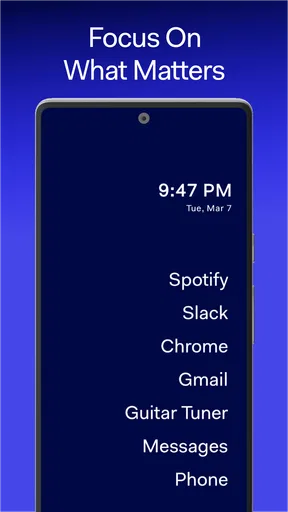
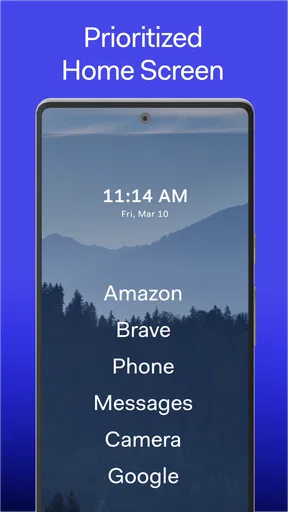
From the moment I installed Before Launcher, I felt a sense of calm. The app prides itself on its minimalistic approach, aiming to help you focus on what truly matters. It didn’t take long to notice how much cleaner and simpler my home screen looked. Gone were the cluttered icons and endless widgets, replaced by a clean, distraction-free interface.
Before Launcher is a personalization app from ⎋ Before Labs, but its value is less about decorating a screen and more about changing the choices that screen presents. Its store summary points toward mindfulness, and I think that is the right way to understand it: the launcher gives you a quieter starting point, while the habits that follow still depend on how you use your phone.
Getting Started
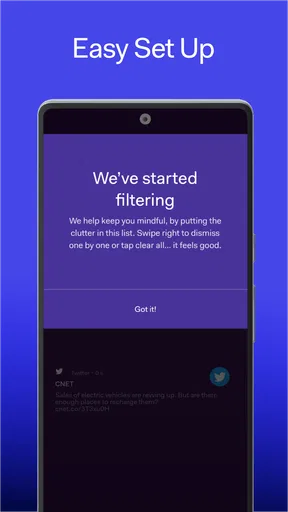
Setting up Before Launcher is a breeze. The app guides you through its features with a straightforward tutorial. You can easily select which apps you want on your home screen, and which notifications are important enough to break through the silence. The idea is to make you more intentional with your phone usage, curating an environment where essential functions are at your fingertips.
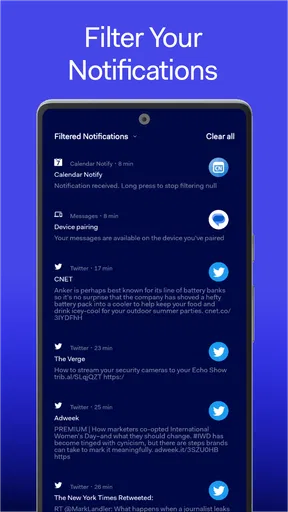
One of the standout features is the focus mode. This allows you to mute the noise of less important notifications, ensuring only the crucial alerts get your attention. It’s like having a digital doorman, sifting through what’s vital and what’s not.
The useful decision here is not simply which apps deserve a place on the screen; it is which interruptions deserve an immediate response. I would start with a deliberately short app list and only allow alerts that genuinely need timely attention. If you include every messaging app and treat every notification as important, the quieter setup loses much of its purpose. You can always adjust your choices after living with them for a few days.
Living with Minimalism
After a few days of using Before Launcher, I noticed a shift in my phone habits. I wasn’t reaching for my device as often, and when I did, it was for a specific purpose. The setup encourages you to be more mindful about how you spend your screen time. It’s almost like a digital detox, but without the harsh withdrawal symptoms.
Worth Reading Before You Choose

EA SPORTS FC Mobile 26 Is a Bigger Football Game, but It Takes Time

Flipboard Shows What News Apps Must Do Beyond the Feed

Switching to Android Auto Means Rethinking Your Driving Routine

Google Calendar Makes a Crowded Week Easier to Manage

Ludo King Makes the Most of the Minutes Between Plans

Baby Panda World Brings Quick Play to Modern Phones, but Its Game Library Feels Busy
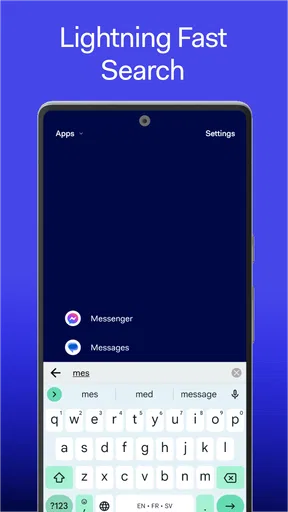
The app also offers a unique feature where you can set up a list of your most used apps. This list appears at the bottom of the screen, giving you quick access without the need to scroll through pages of icons. It’s simple yet effective, ensuring that your productivity isn’t hampered by endless searching.
A realistic benefit shows up during an ordinary workday. Imagine unlocking your phone to check a calendar item before a meeting: a smaller set of visible choices can make it easier to open the intended app and put the phone away. At home, the same restraint can help interrupt the reflex to browse whenever there is a spare moment. It will not remove tempting apps from your device, though, so I would treat the cleaner screen as a helpful speed bump, not a guarantee of reduced screen time.
There is a small but important trade-off in keeping a short app list. You gain quick access to regular essentials, but less-used tools may take an extra step to reach. That is a fair exchange if you want to reduce casual browsing; it can be irritating if your routine depends on switching among many apps throughout the day. I would keep genuinely frequent work, travel, or accessibility tools easy to reach rather than making minimalism a contest in removing everything.
Customization Options
Even though Before Launcher is all about minimalism, it doesn’t skimp on customization. The app allows you to tweak the color scheme and font size, letting you maintain some personality in your setup. The balance between simplicity and customization is perfectly struck, ensuring that you don’t feel like you’re losing out by opting for minimalism.
Moreover, the app’s gesture controls add another layer of efficiency. You can swipe up, down, left, or right to access different functions, making navigation a breeze. It's a small touch that makes a big difference, especially when you’re on the go.
My practical tip is to change one aspect at a time. First settle on the apps you want available, then try the gestures until they become familiar, and only then adjust the visual details. If you alter everything in one sitting, it is harder to tell whether the new layout is genuinely comfortable or merely novel. A font-size adjustment can also matter more than a color choice if you regularly glance at the screen while moving around.
Compared with a typical feature-rich launcher, Before Launcher makes a different bargain. Many launchers invite you to build a personalized dashboard with lots of icons, widgets, and visual options; this one asks you to make the screen less demanding. That makes it a better fit for someone seeking fewer prompts than for a hobbyist who enjoys arranging every corner of a home screen. If widgets are central to your routine, or you want a dense layout for quick access to many tools, a conventional launcher may suit you better.
Performance and Efficiency
One of the biggest perks of using Before Launcher is its impact on your phone’s performance. By cutting down on unnecessary background processes, the app helps conserve your battery life and improve overall speed. It’s a win-win situation where you get a more streamlined experience without sacrificing performance.
On top of that, the app is lightweight and doesn’t hog your phone’s resources. It’s refreshing to see an app that practices what it preaches, delivering a minimalistic experience both in terms of design and performance.
I would separate the everyday value of the simpler interface from broader claims about battery or speed. The clearest reason to try this app is the way it changes the home-screen experience and helps you filter attention; I would not install it expecting a dramatic performance fix. A launcher also becomes part of the most frequently used part of a phone, so a gesture or app-access choice that feels awkward is worth correcting rather than tolerating just because the screen looks neat.
Cost, Compatibility, and Everyday Fit
Before Launcher is free to download, with in-app purchases listed from $1.99 to $6.99 per item. That gives you a chance to try the central minimalist approach before deciding whether any paid option is worthwhile. I would judge value by whether the free experience changes your day-to-day habits; the existence of purchases alone is not a reason to spend, and I would not assume a particular paid feature without checking what is offered in the app.
The app is rated for Everyone and supports Android 7.0 and up. It has a 4.7 average from around 13,000 ratings, with more than 500,000 installs. It was released on March 14, 2019, and its current version is 8.3.1-0774686132. Those figures suggest an established Android app, but the important question for me is still whether its pared-back approach fits the way you use your own phone.
I would recommend it most to people who want a calmer starting screen, use a fairly stable set of everyday apps, and are willing to decide which alerts deserve attention. It is less compelling for someone who enjoys a widget-heavy home screen, needs many apps visible at once, or expects a launcher to enforce strict limits on phone use. If you rely on notifications for work or family, take care when choosing what to quiet; convenience should not come at the cost of missing something you truly need to see.
Final Thoughts
In a world where we’re constantly bombarded with information, Before Launcher offers a breath of fresh air. It emphasizes intentionality and focus, allowing you to take back control of your smartphone experience. Whether you’re looking to reduce screen time, improve productivity, or simply want a cleaner interface, this app delivers on all fronts.
So, if you’re ready to embrace a more minimalistic digital life, Before Launcher might just be the perfect companion. Give it a try, and see how it transforms your relationship with your phone.
My verdict is a measured yes for anyone curious about minimalism who wants to test it without paying upfront. Start by choosing a small group of essential apps and deciding which notifications truly warrant interruption; then use the setup through a normal week, not just a quick first impression. If reaching less-used tools becomes a constant nuisance, or the quieter screen does not change your habits, switching back to a fuller launcher is a sensible choice. The strongest case for Before Launcher is not that everyone needs fewer icons, but that some people benefit when their phone stops asking for attention at every unlock.
Pros
- Streamlined interface for faster navigation.
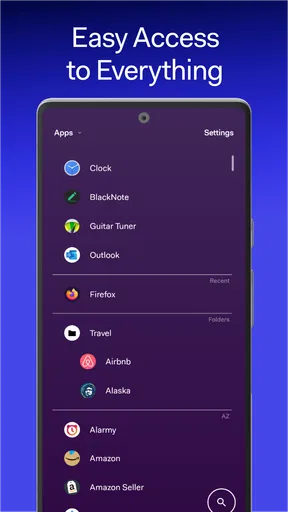
- Customizable app drawer for easy access.
- Minimal notifications reduce distractions.
- Boosts phone battery life significantly.
- Simplifies user experience effectively.
Cons
- Limited widgets compared to other launchers.
- May lack advanced features for power users.
- Basic customization options might not satisfy all.
- Requires adaptation for users used to clutter.
- Some users may miss detailed notifications.
FAQs for Before Launcher | Go Minimal
What is Before Launcher and how does it improve phone usage?
Before Launcher is a minimalist app designed to streamline your smartphone experience by reducing distractions. It simplifies your home screen, focusing on essential apps and notifications. This minimalist approach helps users concentrate on important tasks by removing unnecessary clutter, thus enhancing productivity and reducing screen time.
How does Before Launcher handle notifications?
Before Launcher offers a unique approach to notifications by filtering and displaying only the important ones. It prioritizes alerts from essential apps, helping you avoid distractions from less important notifications. This allows users to stay focused on what truly matters without constant interruptions.
Is Before Launcher customizable to fit individual preferences?
Yes, Before Launcher is highly customizable. Users can choose which apps appear on the home screen, adjust notification settings, and even select themes to match their personal style. This flexibility ensures that the launcher can be tailored to fit individual needs while maintaining its minimalist design.
Does Before Launcher affect the performance of my phone?
Before Launcher is designed to be lightweight and efficient, having minimal impact on your phone's performance. By reducing the number of apps running in the background and optimizing your home screen, it can potentially enhance your device's speed and battery life, making it a practical choice for older devices as well.
Is Before Launcher compatible with all Android devices?
Before Launcher is compatible with most Android devices running Android 5.0 and above. However, performance may vary depending on the device's specifications. It's advisable to check the app's compatibility with your specific device model in the Google Play Store before downloading.


